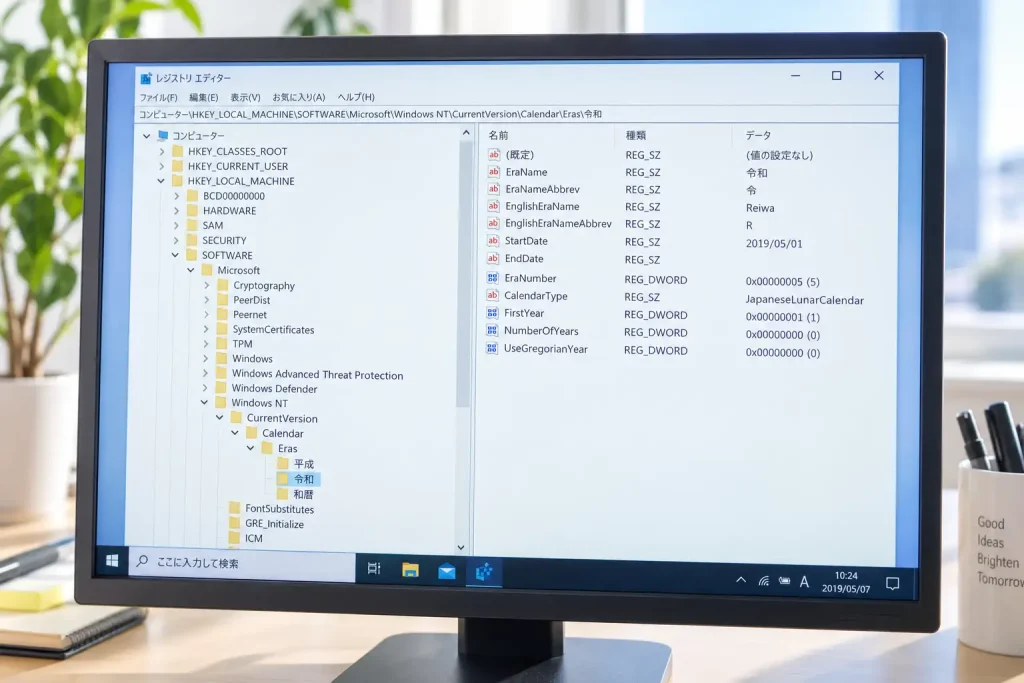
Windows did not need a new calendar in 2019; it needed a new row in a registry table that told applications what to call dates beginning May 1. That is the mechanism behind the japanese era windows excel 2019 problem. Excel, .NET applications, government systems, and some legacy programs already knew the underlying Gregorian date. What they did not know until April 1, 2019, was the text that had to appear beside it: 令和, Reiwa, officially rendered by Japan’s government as “beautiful harmony.”
This distinction matters. A date such as May 1, 2019 did not become a different point in time when the era changed. Software still stored or calculated the same date, but any layer responsible for displaying, validating, importing, exporting, or printing a Japanese era year needed an updated era definition.
A well-designed system could accept the new definition as data. A brittle system had 平成, Heisei, literally “achieving peace,” embedded in program code, field widths, validation rules, report templates, or database records. Those systems did not have one update to make. They had a chain of assumptions to find.
One date, several layers of software
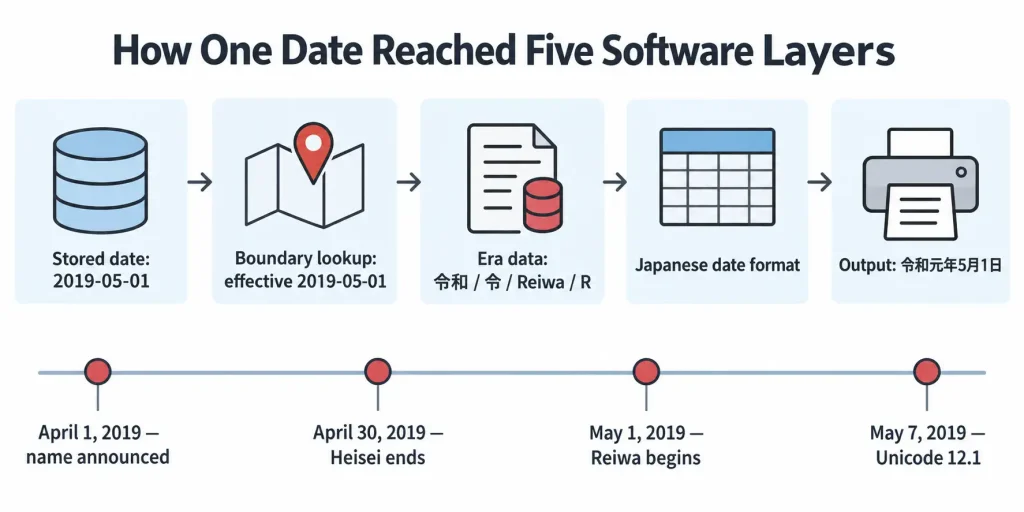
A Japanese business application may store May 1, 2019 as a Gregorian date while showing it to a user as 令和元年5月1日, Reiwa gannen gogatsu tsuitachi, “May 1 in the origin year of Reiwa.” 元年, gannen, literally “origin year,” replaces the numeral one in conventional Japanese era presentation.
The stored value, calendar rules, era name, abbreviated era character, and final screen or printed output are separate layers. Updating only the visible label does not repair a validator that rejects Reiwa year one, a sorter that treats the era year as an ordinary year, or an export routine that has no code for the letter R.
That is why the event was wider than a font update. The era name was announced on April 1, 2019, and took effect on May 1, leaving one calendar month between the official announcement and the transition. Vendors could prepare generic support before the announcement, but they could not complete a production definition containing the real name, abbreviation, and characters until the government disclosed them.
The everyday places where these dates remained operational are covered in The Documents That Refuse the Western Year. This article stays below that visible layer and follows what software had to do when the era table acquired a new entry.
The Windows registry was the era dictionary
Microsoft designed modern Windows to keep Japanese era definitions under the registry path:
HKEY_LOCAL_MACHINE\SYSTEM\CurrentControlSet\Control\Nls\Calendars\Japanese\Eras
A value name identifies the date on which an era begins. Its data supplies the full Japanese name, abbreviated Japanese name, English name, and English abbreviation. For Reiwa, the effective date was May 1, 2019, and Microsoft documented the definition as a new entry rather than a rewrite of Heisei.
| Registry element | Reiwa example | What the application learns |
|---|---|---|
| Effective-date value | 2019 05 01 | The first day on which the era applies |
| Full Japanese name | 令和 | The name used in complete Japanese dates |
| Japanese abbreviation | 令 | The compact form used in limited fields |
| English name | Reiwa | The romanized name |
| English abbreviation | R | The short Latin identifier |
The detail outsiders often get wrong is assuming every Windows program automatically reads this branch. Microsoft explicitly advised developers not to hard-code era information, but an application can carry its own calendar library, cache old data, use an unsupported framework, or ignore the operating system’s globalization services entirely. Patching Windows therefore updated a shared source; it did not guarantee that every program consumed it correctly.
Microsoft also warned developers not to assume that the current era would be the last entry, that an era name would fit a fixed length, or that there would always be exactly four supported eras. Those assumptions sound obviously unsafe after the event. Before 2019, they could remain invisible for decades.
For the human-facing rules behind those values, Japanese Era Years: Meiji to Reiwa, Explained covers the conversion system and its midyear boundaries. The software problem begins where that conversion becomes a field, format string, or database rule.
The Japanese era Windows Excel 2019 failure path
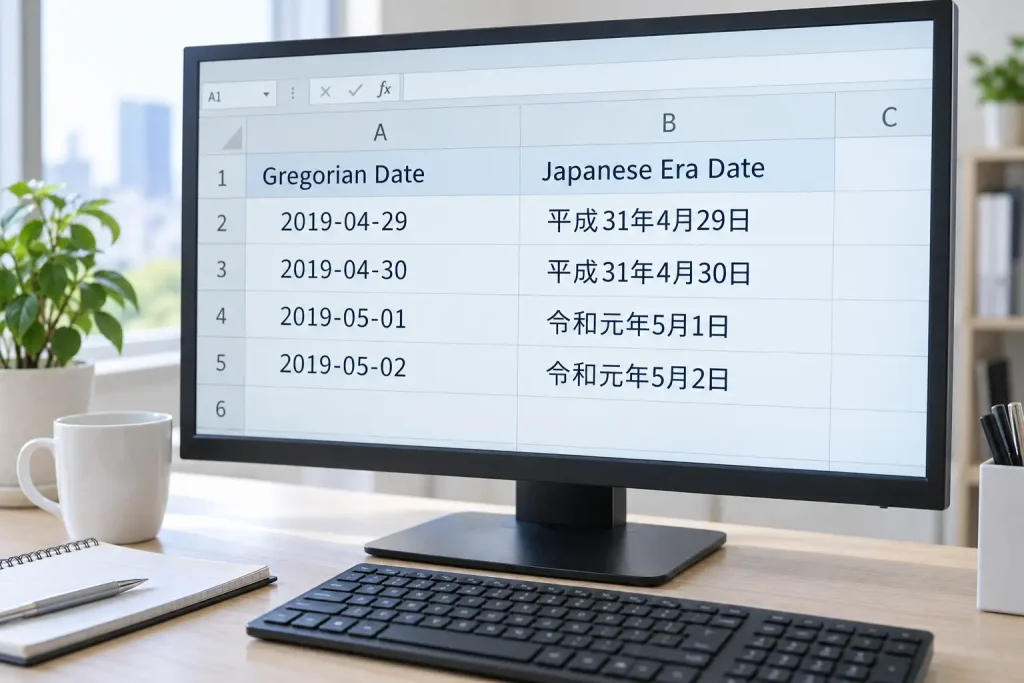
Excel normally stores a date as a serial value and applies a number format when it displays that value. Changing the cell format can therefore make the same stored date appear in Gregorian notation or in a Japanese era date format. The number underneath does not need to change.
In Excel’s Japanese date formats, format components select the era name and era year. A full display can produce a value such as 平成31年4月30日 for April 30, 2019, then 令和元年5月1日 for the following day once the operating system and Office contain the new definition.
| Stored date | Correct Japanese display | Boundary behavior |
|---|---|---|
| April 30, 2019 | 平成31年4月30日 | Last day of Heisei |
| May 1, 2019 | 令和元年5月1日 | First day of Reiwa |
| January 1, 2020 | 令和2年1月1日 | Second Reiwa calendar year |
The outsider’s mistake is to treat this as a text-replacement job: find “Heisei” and replace it with “Reiwa.” That would corrupt every historical Heisei date. The correct output depends on the complete date, because 2019 belongs to Heisei through April 30 and Reiwa from May 1.
The same trap affects formulas and imports. A cell containing real date data can be reformatted after an update. A cell containing literal text such as “H31.04.30” cannot be repaired reliably by changing the display format. Text has to be parsed, assigned to the correct era, validated against the era’s actual boundaries, and converted into a date value.
Excel also had to handle 元年, gannen, rather than merely displaying “year 1.” Microsoft added and documented support for the conventional first-year form. That seemingly small typography rule could break fixed-width reports, comparisons based on rendered text, and templates designed around a numeral.
Reiwa did not change Excel’s date. It changed the instructions that turned the date into Japanese text.
Why 〓 was a warning, not the name of a new era
The symbol 〓 is called a geta mark. Its Unicode code point is U+3013, and it has long been used as a replacement mark when Japanese text cannot display or transmit the intended character. It resembles the wooden footwear called 下駄, geta, literally “wooden clogs.”
Before the announcement, articles discussing poorly prepared systems used an output such as 〓01年05月01日 to illustrate what a failed document might print when it had no valid era name. That makes 〓 useful for explaining the risk, but calling it the official Reiwa placeholder character would be inaccurate. It was neither the government’s temporary era name nor Microsoft’s final registry value.
A black diamond, empty square, question mark, or geta mark can appear at different failure points. The application may lack the new characters. The selected font may not contain a glyph. A legacy encoding conversion may be unable to represent the data. A report generator may deliberately substitute a visible mark rather than silently drop an unknown character.
Unicode had already reserved U+32FF for the square ligature representing the new era name. Unicode 12.1, released on May 7, 2019, assigned that code point to ㋿, SQUARE ERA NAME REIWA. Ordinary Reiwa text did not require that single compatibility character: the existing kanji 令 and 和 could be stored separately. The special square character mattered for compatibility with the compact enclosed symbols used for earlier eras.
COBOL was not the bug
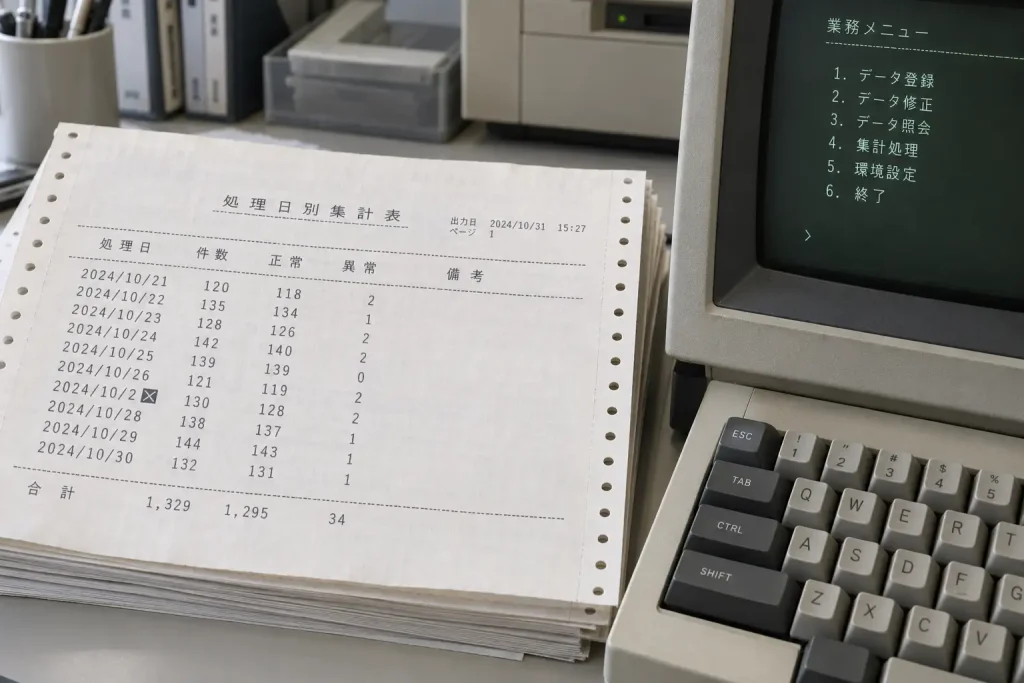
COBOL did not contain a rule that rejected Reiwa. The real risk was legacy date processing built around old assumptions, regardless of whether the program was written in COBOL, Java, C, or another language. COBOL appears in the story because Japanese banks, insurers, government offices, and large companies have long used mainframe systems for high-volume administrative processing.
A legacy record might store a one-character era code followed by a two-digit year. A program could accept S for Shōwa and H for Heisei while treating every other value as invalid. Another routine might convert a year by applying a fixed Heisei offset. A printed form might reserve space for two kanji but pass through an encoding table that had not been updated.
The difficult part was not necessarily changing one line of source code. Teams had to locate every copybook, input screen, batch job, database field, interface, downstream file, and report that carried an era value. A central conversion routine could be repaired once. Duplicated date logic buried in separate applications had to be found and tested separately.
This is also why “the mainframe was old” is an incomplete diagnosis. A carefully maintained COBOL service that stored Gregorian dates and obtained era definitions from a controlled table could adapt cleanly. A recent web application with “H” hard-coded in JavaScript could fail immediately.
One month was enough only for the final label
The Japanese government announced 令和 on April 1, 2019. The era began on May 1, 2019. Vendors therefore had one month of final-name testing, but they did not have only one month to prepare for the existence of a new era.
Microsoft published guidance and preliminary updates before the name was known. Windows builds could include a test entry or placeholder era definition so developers could simulate a transition. OpenJDK likewise used a temporary “NewEra” value before replacing it with Reiwa after the announcement.
The precise distinction matters:
- The transition date was known in advance.
- Developers could test whether software accepted an additional era.
- The final Japanese name and abbreviations could not be inserted before April 1.
- Production tests using the real characters and final metadata had to occur before May 1.
- Organizations using unsupported or isolated systems could not assume vendor patches would reach them automatically.
The uncomfortable fact is that the planned abdication gave the industry unusually generous structural notice. A system that still required its era name to be compiled into dozens of independent programs was exposing a design problem that had existed long before Reiwa.
Four consequences the interface did not reveal
First, two computers could display the same stored date differently. If one machine had the relevant Windows and Office updates and another did not, a shared workbook could show Reiwa correctly on one device and an old or incomplete era representation on the other. The file alone did not control every part of the presentation.
Second, correct display did not prove correct validation. A report could print 令和 while an input routine still rejected R01, or it could accept a nonexistent Heisei date after April 30, 2019. Testing had to cover entry, calculation, storage, exchange, and output rather than a screenshot.
Third, alphabetical abbreviations became data. The addition of R affected dropdown lists, fixed allowed-value sets, interface specifications, and files whose documentation said that the era field accepted M, T, S, or H. The new letter was short, but its effects could travel across organizational boundaries.
Fourth, the first-year convention changed string length. 元 is one character, as is the digit 1, but their encoding, sorting, parsing, and semantic meaning are not interchangeable. Code that expected a numeric era-year field could not simply receive 元. The data layer might retain the number one while the presentation layer rendered gannen.
If you encounter the resulting date on a license or official card, Reading Your License, Card and Register explains the printed document rather than the software underneath it. When you must supply a date yourself, Which Year to Write on a Japanese Form covers the choice between 和暦, wareki, “Japanese calendar,” and 西暦, seireki, “Western calendar.”
Where the shared mechanism stops
Not every application on Windows uses the Windows registry era table. Java can rely on its own runtime data. A browser application may implement conversion on a server. A mainframe can maintain a local master table. A database may store only ISO-style Gregorian dates and leave all Japanese formatting to a reporting service.
Excel behavior also varies with operating-system support, Office version, update status, locale, and whether a cell contains a true date or plain text. A modern formatting rule cannot safely reinterpret every historical text string. The visible similarity between “H31.4.30” and a date-formatted cell hides a different internal type.
The Windows registry era key is therefore a major mechanism, not a universal one. It explains how Windows-aware software can receive updated era data without rebuilding its calendar logic. It does not explain systems that deliberately bypass Windows globalization services.
For ordinary conversion, use the site’s era converter covering every year from 1868 through 2050 and all five modern eras. If you need a reference you can scan rather than a software postmortem, Showa, Heisei and Reiwa Year Tables provides the year mappings and flags transition years.
The test a future system must pass
A robust application should treat an era as data with an effective date, not as permanent wording in program logic. It should accept a new table entry, preserve historical entries, validate dates against exact boundaries, and keep its underlying date independent of the displayed calendar.
You can test that design without knowing the next era’s name. Add a fictional future entry in a controlled test environment, assign it an effective date, and check whether input, storage, calculations, sorting, exports, printed reports, and accessibility output still work. Never make that test modification on a production machine, because Microsoft warns that incorrect registry changes can damage the operating environment.
A practical test sequence is:
- Add a temporary era definition in an isolated test system.
- Enter dates immediately before, on, and after its effective date.
- Check full and abbreviated era names.
- Check the first year as both numeric data and gannen display.
- Export and re-import the records.
- Open the same file on patched and deliberately unpatched test clients.
- Verify that historical dates keep their original era names.
- Remove the temporary entry after the test.
The rule to carry away is simple: store the date, load the era, and format the result—never weld all three into one string.